Invoice Simple helps you go from first estimate to paid in full without the extra work. Create professional estimates in seconds, send them to your customer, and convert approved work into invoices with a click. Everything stays in one simple workflow, so you can spend less time on admin and get paid faster — whether you work in an office, or on the go. Discover professional invoicing, built for small businesses.

Estimate to Invoice In One Simple App
- Create professional documents in seconds
- Convert estimates into invoices with just one click
- Send, approve, and track everything all in one place


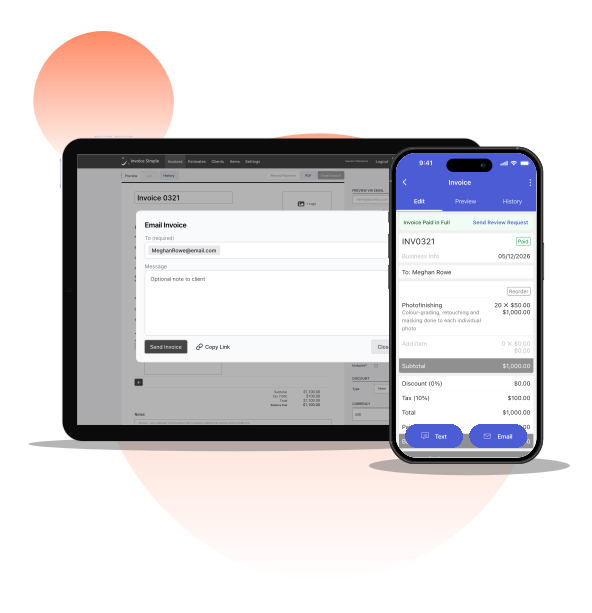

Effortless Estimates. Polished Invoices.
Go from Estimate to Invoice Without Double Work
Create a professional estimate, send it for approval, and convert it into an invoice with a click when the job is ready to start. Customer details, line items, pricing, and notes all carry over automatically—so you don’t waste time re-entering information. Have repeat jobs? Schedule recurring invoices to automatically generate and keep your cash flow moving.
- Save time on admin and reduce errors
- Keep job details, pricing, and customer info synced
- Get digital approvals so you can start the job faster

Create estimates and invoices anywhere you work
Invoice Simple is built to work anywhere you work. Easily create and share estimates or invoices from your phone, tablet, or computer. Whether you’re in the office, the job site, or your truck, Invoice Simple makes it easy to get the job done.
- Create documents before even leaving the job site
- Share estimates & invoices faster via email, text or print
- Enjoy easy-to-use tools, synced on desktop and mobile

Send customized, professional documents every time
Fast estimating and invoicing doesn’t mean basic. With Invoice Simple, you can customize your documents so that your customers clearly understand the work and feel confident approving it. Add your company branding, detailed line items, pricing, notes, discounts, and photos to every estimate or invoice.
- Add services, pricing, and customer details
- Include your branding, notes, photos, and discounts
- Create clear, professional documents clients will trust

Send estimates and get approvals faster
Once your estimate is ready, send it instantly by email, text, or print. Your customers can easily review, approve, and even add their signatures digitally, right on the estimate. Invoice Simple lets you move faster so you win more jobs with fewer delays.
- Share estimates by email, text, or print
- Let customers review and approve quickly
- Capture digital signatures to start work faster

Send invoices and get paid without delays
Once an estimate is approved, turn it into an invoice in one click and send it instantly by email or text. Customers can pay quickly, while you track payment status right from the app. For repeat jobs, automate the process with Recurring Invoices and Automatic Payments, so invoices go out on time and payments come in without repetitive work.
- Track invoice status in real time
- Let clients set recurring invoices to auto pay
- Use built in AI-tools to make new invoices in seconds

Go from Estimate to Paid in 3 Easy Steps

Create Professional Estimates
Win more jobs with professional estimates that include customer details, photos, a detailed cost breakdown, and capture customer signatures.

Convert Estimates to Invoices
Save time on admin work by converting approved estimates into invoices with one click, then easily share them with customers via email, text, or print.

Get Paid Online or in Person
Get paid faster by letting customers pay their invoices online with embedded QR code payment links or in person via card, ACH, mobile wallet, and more.
Built with Features You'll Love

Mobile Invoicing

Estimate to Invoice

Customize the Details

Accept Digital Signatures

Email, Text, Print

Accept Partial Payments

Quick Invoices with AI

Set Recurring Invoices

Allow Auto-Pay
FAQs
Have more questions about creating estimates and invoices with Invoice Simple? Explore our most frequently asked questions:
Typically, an estimate is sent before work begins. It clearly outlines expected pricing and job details for your customer and by approving the estimate, your customer is approving that the work can officially start. In contrast, an invoice is sent after work is approved or completed as a request for payment. Invoice Simple is both an estimate app and an invoice app, which means you can easily move from estimate to invoice without re-entering information, all in one simple app.
Yes. Invoice Simple allows you to convert an approved estimate into an invoice with a click. The estimate-to-invoice functionality ensures all customer details, line items, notes, and pricing carry over automatically, to save you time and reduce manual data-entry errors.
Creating an estimate for a customer in Invoice Simple is easy. Start by adding your customer’s details, then list the services or products you’re providing with pricing and quantities. You can include logos, notes, photos, or discounts to make everything clear and professional.
Once your estimate is ready, review it and send it by email or text so your customer can see the details and respond quickly. With Invoice Simple, you can create and send a professional estimate in minutes—from your phone or computer—without complicated setup or extra steps.
It’s no secret that tax preparation for small business can be stressful. That’s why Bookkeeping keeps you organized all year long, so tax season is simple, not stressful. Everything is tracked and categorized automatically within Invoice Simple. That way, you’re always prepared without last-minute scrambling or long hours working in spreadsheets.
You can easily identify business tax deductions, generate financial reports, and export to your accountant in just a few clicks. By keeping your records accurate and updated, you can expedite tax filing and file with confidence.
First time making an estimate? Try Invoice Simple’s free estimate maker.
After a job is approved, you can create an invoice in two simple ways: start a new invoice or convert the approved estimate into an invoice.
The fastest option is to convert your estimate. With Invoice Simple’s invoice maker, all your customer details, services, pricing, and notes automatically carry over—so you don’t have to re-enter anything. This reduces manual work and helps avoid errors.
If you prefer, you can also use the invoice generator to create a new invoice from scratch. Either way, you’ll get a professional invoice that’s ready to send in minutes. Once it’s complete, you can send it by email or text and start collecting payment right away.
Invoice Simple makes it easy to create an invoice that looks professional, saves time, and keeps your workflow moving from approved job to paid—without extra admin.
Create your first invoice free with our online invoice generator.
Have more questions about creating estimates and invoices with Invoice Simple? Explore our most frequently asked questions: